The Reason
I have an increased interest in analysing data and what information you can extract from it. While it was part of my further education in early 2020 I was in need of a side project. (While my further education of the matter in early 2020 I was in need of a side project.) So I came up with the idea of analysing a very active WhatsApp group of mine. After two years of chatting, there is enough data so I can refer to it easily and make it the best use-case to learn new things.
Disclaimer
I know that “hacking into WhatsApp” and analysing chat messages might not be the most legal thing, but as a private project and nobody else having access to the data, this should be fine.
The Problem: Getting the Data
Before I was even able to start, the biggest issue was to get the data in first hand. In Germany WhatsApp doesn’t allow any way of exporting the messages anymore. So I asked a friend if he has a backup of the chat. Fortunately he exported a text file while that was still possible. Unfortunately, it is only one of the two years. So I read that there is no other way than decrypting the local message.db file on my phone to get the chat messages stored inside the database file. For that I needed the database key from the phone, but extracting that key requires a rooted phone though. I didn’t want to root my current phone, so I used my old HTC One M7 to give it a try. WhatsApp uses one database key per phone number so I was fine with switching devices.
Because I have never done that before I always thought it is a difficult thing to pull off, but I successfully rooted my phone in a few hours. Then I changed my WhatsApp account temporarily to my old phone, grabbed the database key, copied all the files to my PC and decrypted the database file with it.
The Struggle: Clean up the Data
I was happy that I have all the messages of the years. Unluckily for me, I had two different sources of data. One text file from my friend of the first year and a JSON-based file from the database for another year. And the way the messages and information inside the text file are stored didn’t match with the JSON file.
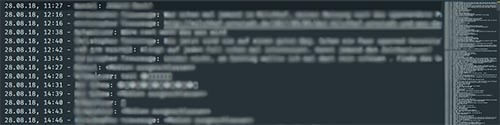 The text file without any database-like format
 The original extracted JSON file from WhatsApp
So I wrote a Python script which converts the text file into a JSON file, which in turn matches the style and information of the one I extracted via the message.db. There was a lot of regex, working with strings, try and fail with timestamps (puh, annoying) and encoding/decoding “emoji-characters”.
The Achievement: The First Plots and a Fun Fact
After merging both JSON files to a single file I started analyzing my data. Therefore I used the pandas library for manipulating the data via so called dataframes and the matplotlib library for displaying the diagrams.
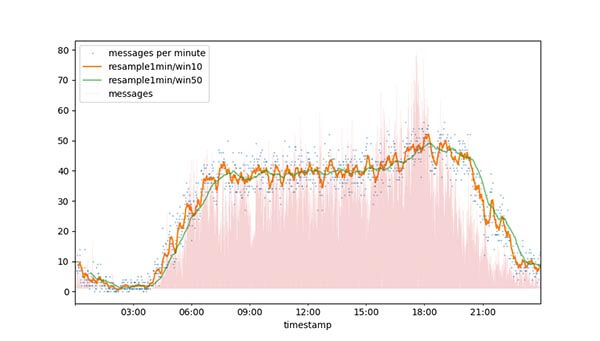 Cumulated messages per minute over 2 years
This is a representation of the cumulated messages per minute over the last two years. It doesn’t represent the actual messages per minute, e.g. with an average. With the amount of data it is easily to see some behaviour:
- The most messages were between 8am and 19pm.
- There are uprising spikes in the orange curve between 5am and 8am, which I would assume is the time somebody new wakes up and responds to an earlier message.
- In the density lines in the background, you can see a gap somewhat after 9am, which I interpret is the time when you grab a coffee or have a daily meeting in the office.
- There is also a spike in the evening, after that the activity decreases rapidly.
- Summary: Over the last two years there were around 40 messages a minute in the main time of the day.
This one shows the average message count, either per 30 seconds (blue dots) or an average (orange line). And this one corresponds nicely with the cumulated chart before. Analysing the information of the blue dots, gives you the fact that there are way more “smaller messages” per 30 seconds. Why there is a gap between 2 and 2 ½ I can only guess. Maybe if there is already more activity, others join more frequently?
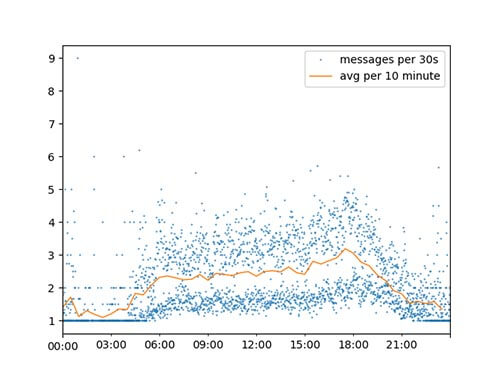 Average amount of messages per 30 seconds
But why 30 seconds as a time interval? Well, we (the humans) tend to check our messages frequently and respond to them quickly and more often. If you increase the timespan, the information that there are indeed more messages would be lost. In the end it is still the same result on average, but you lose some important information. See below.
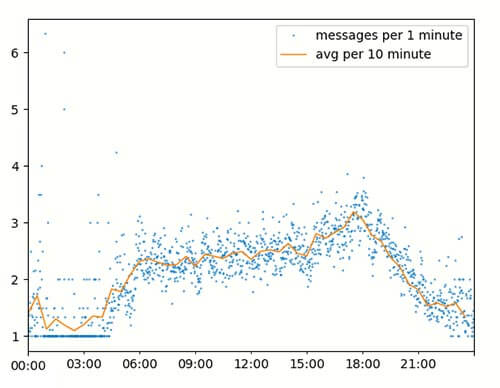 Average amount of messages per 1 Minute
Fun Fact: Now I wanted to know how long it would take to read through the complete chat. After some research I found that 10 words are approximately 50 characters, and reading 500 words takes around 228 seconds. Which means it takes 0,456s reading one word.
So I calculated the average length of a message in our chat, which is 50 characters or 10 words. Due to the fact of messages with only emojis or skippable content, I estimated an average reading time of three seconds per message.
The whole chat contains 90154 characters, which are around 18.030 words and 54090 seconds or 15h to read through the whole chat.
The Future: Jupyter Notebook and more Analysis
As this process is quite time consuming and just a side project, I haven’t got any further. For the future I will make an interactive chart with Jupyter Notebook using the UI widgets. I also plan on doing a language analysis after I have done the meta and numerical work.
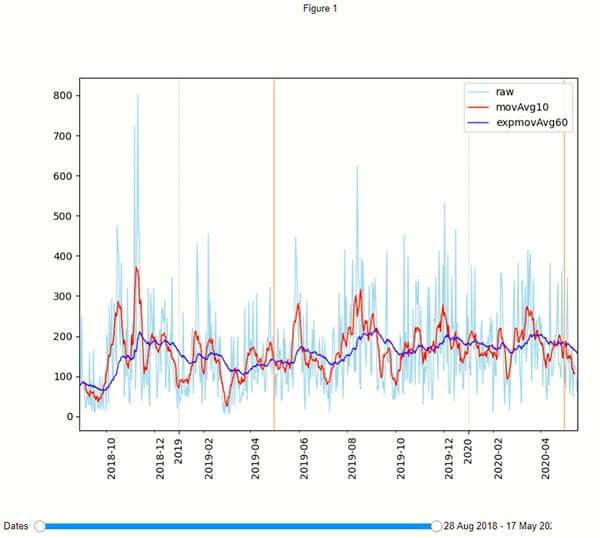 All the messages per day with the light blue line and two average lines for testing purposes. The 2 vertical orange lines are simply the yearly anniversary.